Paid plugin
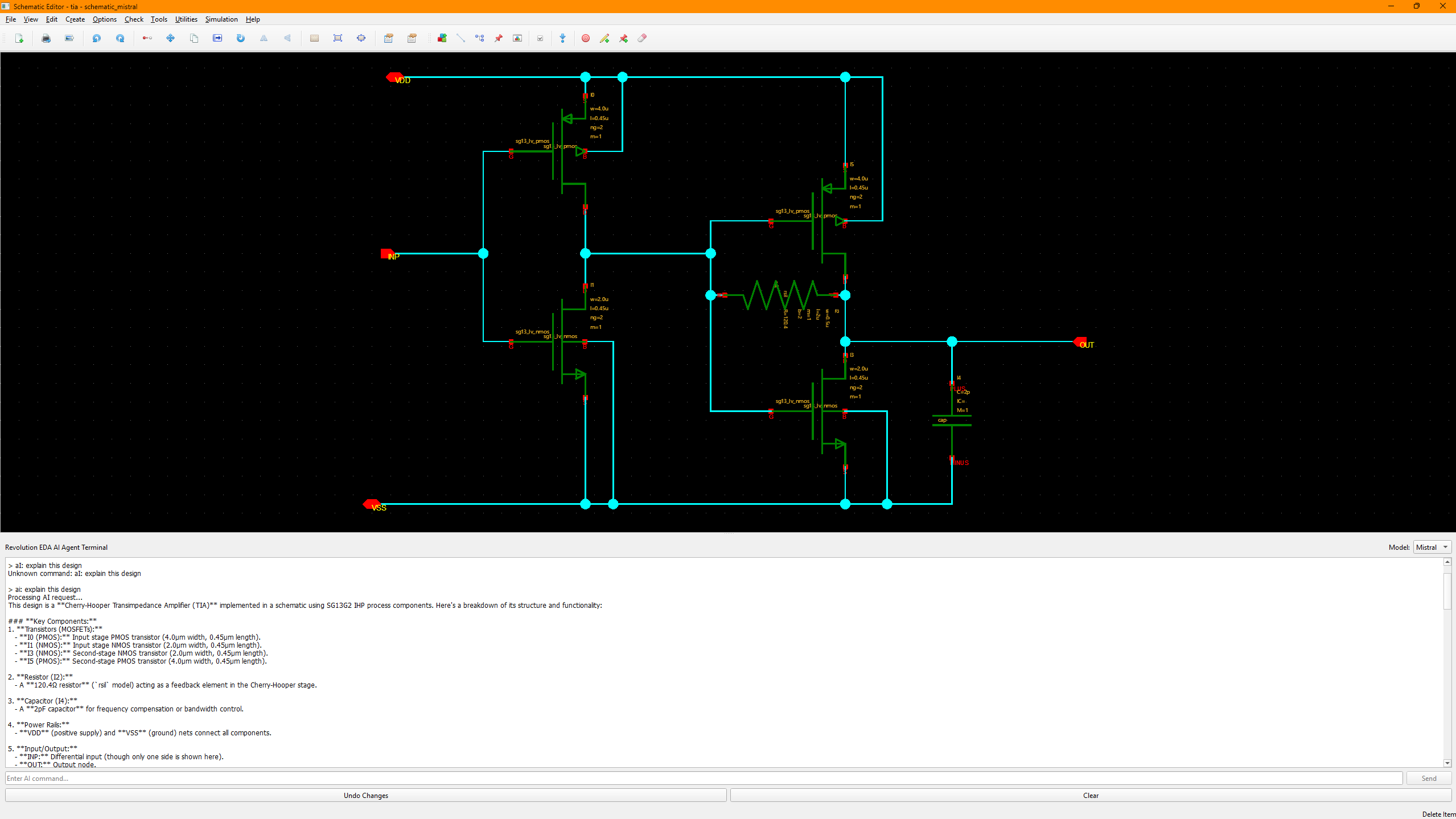
AI Terminal
EUR 29.99 + VAT/month
This plugin is available as a commercial add-on for Revolution EDA.
AI Terminal Plugin for Revolution EDA
Overview
The aiTerminal plugin provides an AI-powered terminal for editing schematic, symbol, layout, and simulation-bench views using natural-language requests. The current plugin supports Anthropic Claude, Google Gemini, and OpenAI models. AI provider API access and usage are separate from the plugin license.
Features
- AI-Powered Design Modification: Use natural language to request changes to your designs
- Multiple AI Providers: Select Claude, Gemini, or OpenAI models in the terminal
- Validated Design Changes: Candidate edits are checked against design schemas and local library resources before being saved
- Backup and Undo: Recovery backup and editor undo support for applied modifications
- Design Commands: Inspect views with
read, request changes withai:, or useops:and planning commands for structured tasks - Secure API Key Management: Fernet-encrypted storage of provider API keys
- Customizable AI Instructions: User and project instruction files tailor AI behavior
- License Management: Commercial license validation at use time
Installation
- Check Plugins → Browse Plugins… for a compatible package, or place the plugin in your configured
REVEDA_PLUGIN_PATHdirectory. - Restart Revolution EDA after installing or changing the plugin path.
- Activate a valid license and provide your own API key for the selected AI provider. Registry availability may differ by platform.
Usage
Opening the Terminal
Open the AI Terminal via Utilities → AI Terminal or use the keyboard shortcut Ctrl+T. The terminal appears as a panel inside the editor window. It is available in the Schematic Editor, Symbol Editor, and Layout Editor.
Setting Up API Keys
Before using the AI features, you need to set your API key:
- Select your preferred model from the dropdown in the terminal title bar
- Type
setkeyand press Enter - Enter your API key when prompted
- The key will be encrypted and stored securely in
~/.reveda/api_keys.enc
Basic Commands
help— Display available commandsread— Display the current design JSONundo— Revert the last applied changenew— Clear the current conversation contextsetkey— Set or update the API key for the selected modellicense— Show license statusai:<request>— Send a natural-language request to the AI agentops:<request>/plan:<request>— Request structured design operations or layout planning
Example Requests
ai:Add a 100fF capacitor between nodes A and Bai:Change the width of NMOS current mirror transistors to 1.0umai:Connect the output of inverter I1 to the input of NAND gate N1ai:Create a differential pair with matched transistors
Model Selection
Switch between AI models using the dropdown in the terminal title bar:
- Claude — Anthropic models
- Gemini — Google models
- OpenAI — ChatGPT models
Customizing AI Instructions
The AI Terminal supports configurable instruction files that let you tailor AI behavior per model or per project.
Configuration
Create an ai_config.json in one of these locations:
~/.reveda/ai_config.json— user-wide configuration./ai_config.json— project-specific configuration (overrides user config)
Example configuration:
{
  "instruction_paths": {
    "base_dir": "~/.reveda/ai_instructions",
    "claude": "claude.md",
    "gemini": "gemini.md",
    "openai": "openai.md",
    "general": "general.md"
  },
  "fallback_instructions": {
    "enabled": true,
    "use_builtin": true
  }
}
Instruction Files
Place markdown instruction files in the configured directory (default: ~/.reveda/ai_instructions/). Each model can have its own instruction file, plus a shared general.md that applies to all models. Built-in fallback instructions are used when external files are missing.
Security
- API keys are encrypted using Fernet symmetric encryption and stored in
~/.reveda/api_keys.enc - The encryption key is stored separately in
~/.reveda/key.enc - The plugin requires a valid license to operate; license validation runs inside compiled plugin code
License
Commercial — proprietary add-on to Revolution EDA. A valid license key is required.