Symbol Parameters
Symbol Parameters (paramDefs)
Revolution EDA provides typed instance parameters on symbols as a lightweight CDF system. A symbol author declares which values are editable, their types, defaults, and limits. A schematic user edits those values with typed controls when placing or editing instances.
Labels versus typed parameters
| Concept | Purpose | Defined in |
|---|---|---|
| Symbol label | Visible text, instance value carrier, or computed display | Symbol graphics |
| Typed parameter | Editable value declaration, default, and validation rules | Reserved paramDefs symbol attribute |
A typed parameter enriches an existing NLP label; it does not create storage by itself. Each declaration must match a value-carrying NLP label named @<name> (preferred) or a legacy bare <name>. A declaration without a matching carrier is ignored by editing forms and reported as a warning.
Normal labels are static annotations. NLP labels carry editable instance values ([@name:format:default]); Python labels derive read-only values from PDK callbacks and update as inputs change. See Labels for NLP syntax.
Declare parameters on a symbol
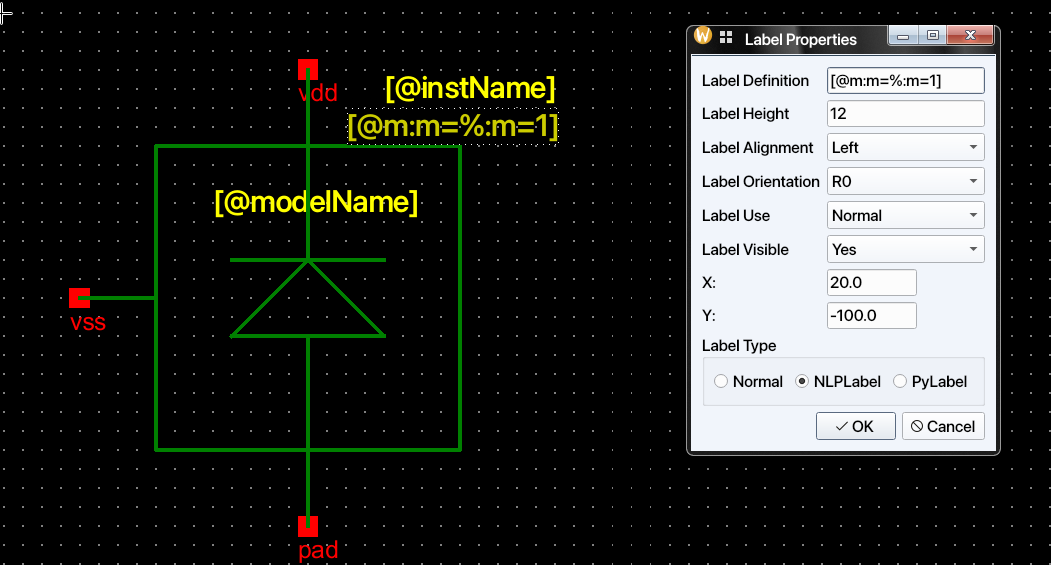
- Open the cell’s symbol view and add an NLP label for each value, for example
[@w:W=%:W=1u]. - Open Edit → Cellview Properties… and add a row for each value in the Parameters table. The name must match the label (
win this example). - Save the symbol and reload any open schematics that use it before placing new instances.
| Column | Meaning |
|---|---|
| Name | Parameter name matching an NLP label |
| Type | float, int, string, boolean, or choice |
| Default | Value used when the instance field is empty; overrides the label default |
| Min / Max | Optional bounds for numeric values |
| Choices | Allowed comma-separated values for a choice |
| Display | If unchecked, hides the parameter from forms without discarding its stored value or validation |
| Parse | Permits SI suffixes such as 1k, 2u, and 130n in numeric values and bounds |
The editor writes these entries to the reserved paramDefs symbol attribute. Duplicate names, invalid bounds, or a choice without choices are reported when saving the symbol. Use the table instead of hand-editing this JSON.
A default may reference a sibling value using pPar("name"), for example pPar("w")*pPar("nf"). References can also be typed into parameter fields; they are resolved before type and range checks. Unresolvable references remain literal rather than silently becoming numbers.
Edit instance parameters
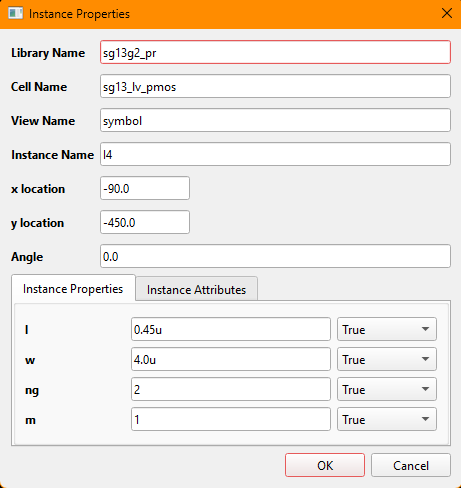
During placement: After Create → Instance…, the Schematic Instance Options form opens before placement. Press F3 to reopen it while placing; values persist for that placement run. The form separates typed Parameters, untyped Instance Parameters, read-only Normal Labels, and read-only Derived Parameters. Boolean parameters use checkboxes, choices use dropdowns, and other types use text fields. Clicking OK checks type, bounds, and choices; invalid values keep the form open.

The placement form also has instance array controls (Rows, Columns, X Pitch, Y Pitch). Leave their defaults for a single instance.
After placement: Select an instance and open Edit → Object Properties… (Q). You can edit values and control whether their labels are visible. Apply refreshes derived values for preview; invalid typed values revert to the previous value. Hidden parameters keep their stored values.
Validate a schematic
Check → Check Schematic validates stored instance values against the symbol’s paramDefs and reports paramValueError warnings alongside connectivity diagnostics. This also catches hand-edited or older values that did not pass through an editing form.
paramDefs does not create a new parameter store or missing label carrier, nor infer PDK limits, PCell mappings, or netlister behavior. Keep parameter names aligned with the labels used by your PDK’s callbacks and netlisters.
Troubleshooting
| Symptom | Check |
|---|---|
| Parameter is plain text instead of typed | Add a paramDefs row with the same name as its NLP label. |
| Missing parameter in form | Check that Display is enabled and the matching label is an NLP label. |
1u is rejected |
Enable Parse and check numeric bounds. |
paramValueError warning |
Open the instance properties and correct the stored value. |
| PCell or callback ignores a new value | Use the label names and mappings expected by the PDK. |
See also Labels and Symbol Editor.